There are few svn gui client in linu, pysvn should be a good choice on Ubuntu,
1 install ubuntu packages pysvn and workbench.
* sudo apt-get install python-svn
* sudo apt-get install svn-workbench
2 You can launch it form application menu: application->programming->svn Workbench
Showing posts with label SVN. Show all posts
Showing posts with label SVN. Show all posts
3/10/2009
Install pysvn and workbench on Ubuntu 8.10 for managing


11/16/2008
使用svnsync镜像版本库
术语
* 主(Master): 将要通过svnsync被同步的活动读/写版本库。
* 镜像(Mirror): 将要与master通过svnsync同步的只读版本库。
注意,svn的版本要大于1.4
实现
实现svnsync的唯一的前提条件是创建一个希望镜像的版本库,一旦创建,你就可以按照下面步骤继续:
Step 1: 创建镜像Repository
svnadmin create MIRROR_REPO_PATH
Step 2: 设置镜像版本库只对同步用户可写
为了让镜像版本库只被同步用户写,我们的例子里用户名是”svnsync”,我们有一些选项,一个就是使用Subversion的授权功能设置缺省的访问规则(在auth文件里设置):
[/]
* = r
svnsync = rw  #MIRROR_REPO_USER
Step 3: 让镜像版本库使用同步用户修改修订版本属性
为此,我们需要创建一个pre-revprop-change钩子,类似于下面的例子,也是shell脚本,在hook文件夹里,有一个建立一个per-revprop-change的文件(不用管他的模版文件),将下面的内容复制:
#!/bin/sh

USER="$3"

if [ "$USER" = "MIRROR_REPO_USER" ]; then exit 0; fi

echo “Only the syncuser user may change revision properties as this is a read-only, mirror repository.”  >&2

exit 1
然后修改这个文件的属性为777
Step 4: 注册同步的镜像版本库
在任何平台使用下面的svnsync命令:
svnsync initialize URL_TO_MIRROR_REPO URL_TO_MASTER_REPO --username=MASTER_REPO_USER --password=MASTER_REPO_PASSWD
如果所有的配置正确,你一定会看到下面的输出:
Copied properties for revision 0.
如果有错误,一般就是上步钩子的问题,仔细阅读错误信息,可以纠正。现在你已经注册了镜像版本库与主版本库的同步,我们必须继续执行初始的同步,这样镜像版本库才和主版本库是一样的了。
Step 5: 执行初始同步
为了确定所有事情已经准备好了,并且执行初始同步,在任何系统只需要执行:
svnsync synchronize URL_TO_MIRROR_REPO --username=MASTER_REPO_USER --password=MASTER_REPO_PASSWD
如果所有的同步正确,你会看到类似的输出:
Committed revision 1.
Copied properties for revision 1.
Committed revision 2.
Copied properties for revision 2.
Committed revision 3.
Copied properties for revision 3.

不过在这里可能会出现 “svnsync: Couldn't get lock on destination repos after 10 attempts”类似的报错,你需要手动清除lock

svn pdel --revprop -r 0 svn:sync-lock --username=MIRROR_REPO_USER URL_TO_MIRROR_REPO

Step 6: 使用post-commit钩子自动同步

根据初始同步的输出,我们现在要做的就是写一个定时执行或post-commit钩子来同步镜像版本库,我建议post-commit,因为它让你的镜像版本库尽可能的最新,下面是可以用在主版本库上同步镜像版本库的post-commit钩子,一个shell脚本:

# Example for synchronizing one repository from the post-commit hook
#!/bin/sh
SVNSYNC=/usr/local/bin/svnsync
$SVNSYNC synchronize URL_TO_MIRROR_REPO –username=svnsync –password=svnsyncpassword &

exit 0

就这样了,一旦你执行了上面列出的步骤,你一定可以得到一个随着主版本库提交自动更新的镜像版本库,我们对于svnsync的介绍和如何去实现它。
11/08/2008
Software versioning
一、版本号
1、V(Version):即版本,通常用数字表示版本号。(如:EVEREST Ultimate v4.20.1188 Beta)
2、Build:用数字或日期标示版本号的一种方式。(如:VeryCD eMule v0.48a Build 071112)
3、SP:Service Pack,升级包。(如:Windows XP SP 2/Vista SP 1)
二、授权和功能划分
1、Trial:试用版,通常都有时间限制,有些试用版软件还在功能上做了一定的限制。可注册或购买成为正式版。
2、Unregistered:未注册版,通常没有时间限制,在功能上相对于正式版做了一定的限制。可注册或购买成为正式版。
3、Demo:演示版,仅仅集成了正式版中的几个功能,不能升级成正式版。
4、Lite:精简版。
5、Full:完整版。
三、开发阶段划分
1、Alpha 版:内测版,内部交流或者专业测试人员测试用。Bug较多,普通用户最好不要安装。
2、Beta 版:公测版,专业爱好者大规模测试用,存在一些缺陷,该版本也不适合一般用户安装。
3、Gamma 版:相当成熟的测试版,与即将发行的正式版相差无几。
4、RC版:Release Candidate 候选版本,处于Gamma阶段。从Alpha到Beta再到Gamma是改进的先后关系,但RC1、RC2往往是取舍关系。
四、语言划分
1、SC:Simplified Chinese 简体中文版。
2、GBK:简体中文汉字内码扩展规范版。
3、TC:Traditional Chinese 繁体中文版。
4、BIG5:繁体中文大五码版。
5、UTF8:Unicode Transformation Format 8 bit,对现有的中文系统不是好的解决方案。
Developing Product based on the SVN
Repository Layout
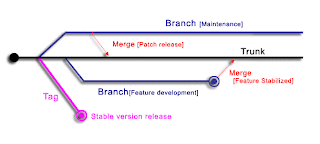
We create a trunk directory to hold the “main line” of development, a branches directory to contain branch copies, and a tags directory to contain tag copies.These top-level directories is :
/trunk
/branches
/tags
1. trunk
The porpose of trunk is for branching, tagging, and merging the source code.
2. branches
Branch , a line of development that exists independently of another line, it always begins life as a copy of trunk's at sometime, and moves on from there, generating its own history.
Type A: maintainable branches for released version
Type B: feature-developing branches for new requirement
3. tags
A tag is just a “snapshot” of a project in time.The aim of tags to save the stable release version of product, there is an new maintainable branch should be build at the same time, just for the patch and issue solution
10/20/2008
Some Commands of SVN
Context: We have a new project named Odour
Get Svn help
$ svn help Get sub-commands' help
$ svn help add Import a new Project
$ cd ~/project
$ mkdir -p Odour/{trunk,branches,tags}
$ svn import svntest https://localhost/svn/Odour --message "Start project"
$ rm -rf Odour
The aim of this operation is to build a new project named Odour, there are three sub-directory in this project involved trank, branches, and tags. Then you should delete the Odour when you have imported the project to our repository named https://localhost/test/svntest
Checkout a project
$ svn checkout https://localhost/test/svntest/trunk --username= yourname Some example about the reversion
$ svn diff --revision PREV:COMMITTED foo.php
# shows the last change committed to foo.php

$ svn log --revision HEAD
# shows log message for the latest repository commit

$ svn diff --revision HEAD
# compares your working file (with local changes) to the latest version
# in the repository

$ svn diff --revision BASE:HEAD foo.php
# compares your “pristine” foo.php (no local changes) with the
# latest version in the repository

$ svn log --revision BASE:HEAD
# shows all commit logs since you last updated

$ svn update --revision PREV foo.php
# rewinds the last change on foo.php
# (foo.php's working revision is decreased)

$ svn checkout --revision 3
# specified with revision number

$ svn checkout --revision {2002-02-17}
$ svn checkout --revision {15:30}
$ svn checkout --revision {15:30:00.200000}
$ svn checkout --revision {"2002-02-17 15:30"}
$ svn checkout --revision {"2002-02-17 15:30 +0230"}
$ svn checkout --revision {2002-02-17T15:30}
$ svn checkout --revision {2002-02-17T15:30Z}
$ svn checkout --revision {2002-02-17T15:30-04:00}
$ svn checkout --revision {20020217T1530}
$ svn checkout --revision {20020217T1530Z}
$ svn checkout --revision {20020217T1530-0500}
Update
$ svn up

add

$ svn add foo.file
$ svn add foo1.dir
$ svn add foo2.dir --non-recursive
$ svn delete README
Conflict
The svn will create three files named .mine, .rOLDREV, .rNEWREV separately When the workcopy have confict with header version, for example:
$ ls -l
sandwich.txt
sandwich.txt.mine
sandwich.txt.r1
sandwich.txt.r2
There are there method to resolve this confict.
Method A: modify the sandwich.txt, then run:
$ svn resolved sandwich.txt Mehtod B: use the header version to override your version
$ cp sandwich.txt.r2 sandwich.txt
$ svn resolved sandwich.txt
Method C: use revert
$ svn revert sandwich.txt
Reverted 'sandwich.txt'
$ ls sandwich.*
sandwich.txt
Then , you can submit your workcopy$ svn commit --message "Correct some fatal problems"
$ svn commit --file logmsg
$ svn commit
Clean Up
svn cleanup Build branch
Method A: local build
$ svn checkout http://svn.example.com/repos/calc bigwc
A  bigwc/trunk/
A  bigwc/trunk/Makefile
A  bigwc/trunk/integer.c
A  bigwc/trunk/button.c
A  bigwc/branches/
Checked out revision 340.

$ cd bigwc
$ svn copy trunk branches/my-calc-branch
$ svn status
A  +   branches/my-calc-branch

$ svn commit -m "Creating a private branch of /calc/trunk."
Adding         branches/my-calc-branch
Committed revision 341.
Method B:remote build
$ svn copy http://svn.example.com/repos/calc/trunk \
           http://svn.example.com/repos/calc/branches/my-calc-branch \
      -m "Creating a private branch of /calc/trunk."

Committed revision 341.
Swith to branch from trunk
$ cd calc
$ svn info | grep URL
URL: http://svn.example.com/repos/calc/trunk
$ svn switch http://svn.example.com/repos/calc/branches/my-calc-branch
U   integer.c
U   button.c
U   Makefile
Updated to revision 341.
$ svn info | grep URL
URL: http://svn.example.com/repos/calc/branches/my-calc-branch
Build a tag
$ svn copy http://svn.example.com/repos/calc/trunk \
          http://svn.example.com/repos/calc/tags/release-1.0 \
     -m "Tagging the 1.0 release of the 'calc' project."

$ ls
my-working-copy/
$ svn copy my-working-copy http://svn.example.com/repos/calc/tags/mytag
Committed revision 352.
Delete a branch
$ svn delete http://svn.example.com/repos/calc/branches/my-calc-branch \
-m "Removing obsolete branch of calc project."
Create a new repository
$ svnadmin help
...
$ svnadmin help create
...
$ svnadmin create bdb /usr/local/repository/svn/test
$ chown -R svn.svn /usr/local/repository/svn/test
Subscribe to:
Posts (Atom)
RSS


 Posts
All Comments
Posts
All Comments

