sudo apt-get install kpdf gnochm
11/15/2008


Ubuntu下图像工具
Scrot
是一个命令行下使用的截图工具,支持全屏、窗口、选取、多设备、缩略图、延时,甚至可以截图完毕之后指定某程序打开截好的图片。
安装:
可以打开新立得搜索 scrot 并安装,也可以在终端:
sudo apt-get install scrot
Scrot 使用:
scrot [options] [file]
描述
scrot 是一个使用 imlib2 库截取屏幕和保存图像的的工具。
选项 [file] 指定截图保存的文件名。 如果 [file] 没有指定,
截图就会以当前的日期和时间为文件名保存在当前目录中。
选项
-h, --help
显示帮助并且退出
-v, --version
显示版本信息并且退出
-b, --border
当选择一个窗口时,同时包含窗口边框。
-c, --count
延时时的显示倒计时
-d, --delay NUM
延时 NUM 秒
-e, --exec APP
对保存的图像执行程序 APP
-q, --quality NUM
图像质量 (1-100) 值大意味着文件大, 压缩率低。
-m, --multidisp
对多个显示设备分别截图并且连接在一起。
-s, --select
用鼠标交互式的选择一个窗口或者区域。
-t, --thumb NUM
同时生成缩略图。 NUM 是缩略图的百分比。
说明符
--exec 和 文件名可以使用可以被 scrot 扩充的格式说明符。有两种类型的
说明符。 '%' 前导的说明符由 strfile(2) 来解释。例程可以查看 strftile
手册。这些选项用来引用当前的日期。第二种说明符由 scort 内部解释并且
使用前缀 '$'. 可以识别的说明符如下:
$f 图像的路径/文件名 (如果在文件名中就会忽略)
$n 图像文件名 (如果在文件名中会被忽略)
$s 图像大小(字节数) (如果在文件名会被忽略)
$p 图像像素大小
$w 图像宽度
$h 图像高度
$t 图像格式
$ 打印字符 'n 打印新行 (如果在文件名中会被忽略)
例子(~ 用户主目录):
1、对全屏截图并保存文件名:
scrot ~/abc.png
2、抓取窗口,b 参数表示带边框窗体,s 用户可以指定窗口:
scrot -bs ~/abc.png
3、抓取鼠标选定区域:
scrot -s ~/abc.png
4、延时抓取,d 表示延时,c 倒计时,10 是秒,抓菜单等其他东西时很好用:
scrot -cd 10 ~/abc.png
5、生成缩略图,t 表示要生成缩略图, 20% 表示缩略图的比例, s 表示截取用户划定区域:
scrot -t 20% -s ~/abc.png
6、启用某项操作 s 划定截图,-e 采用某项行为,这里用 gimp 打开截图图片,
scrot -s ~/abc.png -e 'gimp $f'
agave (龙舌兰)
非常不错,除了取色,配色,还可以将常用的颜色保存起来以备以后使用,apt-get之后就可以使用了
sudo apt-get install agave
Network tools in ubuntu
Wireshark
世界上使用Wireshark的人相当多。它具有一个协议分析程序的全部基本特性,而且还有其它产品所没有的其它特性。其开放源代码文本专利允许专业人员对其进行功能增强的工作。它可以运行在各种计算平台上,其中包括Unix,Linux,Windows等等。
(1)安装
sudo apt-get install Wireshark
(2)运行
如果你想打开Wireshark,可以打开Applications(应用程序)―>Internet(互联网)―> Wireshark
Etherape
EtherApe是Unix系统中的一个图形界面的网络监视器,能够以图形方式显示网络活动。主机和链接通信量的大小可以动态显示。它支持Ethernet、 FDDI、 Token Ring、ISDN、 PPP 、 SLIP等网络类型的设备。它可以过滤显示的通信,并能够从一个文件中读取通信数据,也可以从网络中读取动态数据。
(1)安装
sudo apt-get install etherape
(2)运行:
要运行etherape只需单击Applications―>Internet―>EtherApe:
在打开之后,你就可以看到所有网络协议的所有网络活动。
Ethstatus
Ethstatus是一个基于控制台的监视程序,用以显示以太网接口的统计数据。它与intraf类似,不过它以一个永久性控制台任务的形式运行,并可监视网络负载。
(1)安装
sudo apt-get install ethstatus
如果只是想在命令行上查看网卡的状态,可以直接输入如下的命令:
ethstatus
Install Flex builder in Ubuntu 8.0.4
The blog that follow use a ubuntu 8.04 computer
1 install jre
#sudo apt-get install sun-java6-jre

#sudo update-alternatives --config java

There are 2 alternatives which provide `java'.
Selection Alternative
-----------------------------------------------
1 /usr/bin/gij-wrapper-4.1
*+ 2 /usr/lib/jvm/java-6-sun/jre/bin/java
Press enter to keep the default[*], or type selection number:
choice 2
Then,
#sudo gedit /etc/environment
add the following 2 lines:
CLASSPATH=.:/usr/lib/jvm/java-6-sun/lib
JAVA_HOME=/usr/lib/jvm/java-6-sun
then,
#sudo gedit /etc/jvm
put the following to the top of this document
/usr/lib/jvm/java-6-sun
2 download flexbuilder_linux_install_a4_081408.bin and pdt-all-in-one-linux-gtk-1.0.3.tar.gz
Note:The version of eclipase must great than 3.2, so do not install it use
#sudo apt-get install eclipse
3 install flex builder
# ./flexbuilder_linux_install_a4_081408.bin
The solution without libgtk when install uplink in ubuntu
When I installed the linux game Uplink, There was an error:
edwin@edwin-desktop:~/Desktop$ sh ./uplink-demo-1.54.sh
Verifying archive integrity... All good.
Uncompressing Uplink demo 1.54DEMO...........................................................................................
/home/edwin/.setup10083: error while loading shared libraries: libgtk-1.2.so.0: cannot open shared object file: No such file or directory
So, I install the following:
sudo apt-get install libgtk1.2
sudo apt-get install libgpm1
在ubuntu安装其他主题
Ubuntu Studio
酷炫的Ubuntu Studio主题套件
代码:
sudo apt-get install ubuntustudio-themeubuntustudio-icon-theme ubuntustudio-gdm-theme ubuntustudio-wallpapers usplash-theme-ubuntustudio
Mac4Lin
进入Mac4Lin的工程主页:http://sourceforge.net/projects/mac4lin
点击 Download,然后把需要的软件包下载下来吧!
11/08/2008
Software versioning
一、版本号
1、V(Version):即版本,通常用数字表示版本号。(如:EVEREST Ultimate v4.20.1188 Beta)
2、Build:用数字或日期标示版本号的一种方式。(如:VeryCD eMule v0.48a Build 071112)
3、SP:Service Pack,升级包。(如:Windows XP SP 2/Vista SP 1)
二、授权和功能划分
1、Trial:试用版,通常都有时间限制,有些试用版软件还在功能上做了一定的限制。可注册或购买成为正式版。
2、Unregistered:未注册版,通常没有时间限制,在功能上相对于正式版做了一定的限制。可注册或购买成为正式版。
3、Demo:演示版,仅仅集成了正式版中的几个功能,不能升级成正式版。
4、Lite:精简版。
5、Full:完整版。
三、开发阶段划分
1、Alpha 版:内测版,内部交流或者专业测试人员测试用。Bug较多,普通用户最好不要安装。
2、Beta 版:公测版,专业爱好者大规模测试用,存在一些缺陷,该版本也不适合一般用户安装。
3、Gamma 版:相当成熟的测试版,与即将发行的正式版相差无几。
4、RC版:Release Candidate 候选版本,处于Gamma阶段。从Alpha到Beta再到Gamma是改进的先后关系,但RC1、RC2往往是取舍关系。
四、语言划分
1、SC:Simplified Chinese 简体中文版。
2、GBK:简体中文汉字内码扩展规范版。
3、TC:Traditional Chinese 繁体中文版。
4、BIG5:繁体中文大五码版。
5、UTF8:Unicode Transformation Format 8 bit,对现有的中文系统不是好的解决方案。
Developing Product based on the SVN
Repository Layout
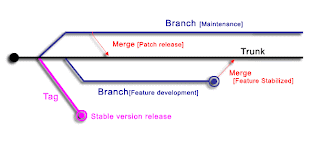
We create a trunk directory to hold the “main line” of development, a branches directory to contain branch copies, and a tags directory to contain tag copies.These top-level directories is :
/trunk
/branches
/tags
1. trunk
The porpose of trunk is for branching, tagging, and merging the source code.
2. branches
Branch , a line of development that exists independently of another line, it always begins life as a copy of trunk's at sometime, and moves on from there, generating its own history.
Type A: maintainable branches for released version
Type B: feature-developing branches for new requirement
3. tags
A tag is just a “snapshot” of a project in time.The aim of tags to save the stable release version of product, there is an new maintainable branch should be build at the same time, just for the patch and issue solution
Subscribe to:
Posts (Atom)
RSS


 Posts
All Comments

